Using KMP at Restia
How Kotlin Multiplatform helped us with our sync engine for mobile clients

Aug 25, 2025
Restia is a restaurant management app. While many similar apps exist on the market, we wanted to address some common issues and improve the overall user experience during development of the app.
A restaurant is managed by a diverse set of users, each with different roles. We have waiters, for example, who take orders from clients and communicate them to the kitchen, where the chefs prepare the food.
One of the critical problems in some restaurants is inconsistent network availability. Waiters have to move throughout different zones, some with poor network conditions, so their ability to use a mobile phone for taking orders can be severely affected.
Having this problem in mind, we eventually came up with a vision of a restaurant as a distributed system with different actors. Ideally, the apps used by the staff should work even when offline and then sync with the rest of the users when connectivity is restored. So, we started developing Restia as an offline-first app, where every action happens locally on the device first and is then eventually synced to other devices.
While designing the sync functionality, we considered different approaches and finally decided on using CRDTs(Conflict-free Replicated Data Types). By modeling our data with CRDTs, we could achieve a distributed and network partition-tolerant system.
We analyzed different architectural approaches for this system:
-
Full native applications. We would have to write the sync logic in both Kotlin and Swift. This presented the risk of having two different implementations of such a critical system, but it offered a native UI for the best possible user experience.
-
Multiplatform application with React Native or Flutter. We would have to sacrifice the smooth, native UIs of each platform while getting a possibility to write our sync logic only once, avoiding the potential pitfalls of having it implemented twice.
After analyzing our options that would help us overcome the drawbacks of listed approaches, we eventually landed on using Kotlin Multiplatform (KMP) for our app. KMP would allow us to write most of our business logic once in Kotlin and still use native UIs for each platform, allowing us to utilize the best of each practice. However, the technology, despite being in development for many years, only reached a stable release late last year, so we knew we might face an immature ecosystem.
We also had to choose a backend for our project. Since this post is about the mobile applications, I will not dive deep into our choice, but we went with Elixir and the Phoenix Framework for its excellent support of WebSockets, which would be useful as the communication layer for our synchronization.
Problems faced during the development
Connecting to Phoenix Channels
When starting with Kotlin Multiplatform, one of our key requirements was a library to integrate Phoenix Channels(WebSockets) into our app.
Third-party native clients exist for iOS and Android, and there was also a GitHub project for a KMP client. However, that project had not been updated in over three years and was incompatible with Kotlin 2.0.
One of the strengths of Kotlin Multiplatform is that it provided us with two paths forward:
-
Create a common interface for the WebSocket clients in the Kotlin
commonMainsource set and provide platform-specific native implementations for it. -
Fork the unmaintained KMP client for Phoenix Channels and update it.
We decided to fork the KMP client and update it to the latest version of Kotlin, with additional improvements and fixes. We are currently using this fork internally but plan to release it as open source in the future.
Interfacing Swift native code with KMP exported framework
When we started working with the exported framework from KMP, we faced some limitations, mostly related to working with Kotlin’s sealed classes/interfaces and coroutines from the Swift side.
After trying different projects that aim to fill the gap between KMP and Swift, we settled with SKIE. It solved most of our interop problems and provided elegant ways to work with Kotlin Coroutines in Swift and SwiftUI.
The pros of using KMP
Now that we have the first version of our app ready, we can reflect on what KMP brought to the project. Currently, we are sitting on an ~80% code sharing between iOS and Android.
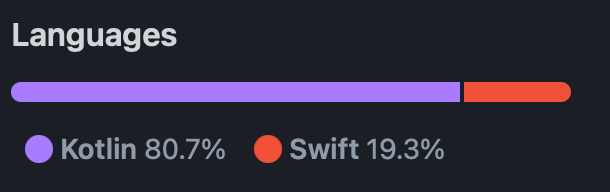
We were able to share all our code, from the domain, data and navigation layers all the way to the presentation logic, stopping just before the UI.
Ultimately, all of our screens are managed by presenter interfaces that look like this:
interface Presenter {
    val state: StateFlow<State>
    val sideEffect: SharedFlow<SideEffect>
    fun on(action: Action)
}
With this architecture, the remaining 20% of native Swift code simply works as a function of our shared state, which produces a view (F(State) → View), calls actions, and reacts to side effects.
The core sync engine works seamlessly on both platforms and offers low-latency synchronization.
Implementing the described architecture, we achieved our initial goal of having the app fully capable of working offline when the connectivity is lost and instantly syncing with other clients once the network is restored.
Kotlin Multiplatform allowed us to get the best of both worlds: native applications with a truly native UI, and a multiplatform core with the shared, robust sync engine we built. Creating Restia while utilizing the named tools led us to believe that KMP allows teams to create mobile experiences that were previously not possible without making significant trade-offs.